
Navigating social media trends and challenges
From music to challenges, social media trends change quickly. Learn how to assess new trends and keep your teen safer online.

What’s on the page
- What are social media trends and challenges?
- How do trends become popular?
- How to assess new online trends
- Frequently asked questions (FAQ) about trends
- Tips to manage exposure to trends and challenges
- Supporting resources
What are social media trends?
A social media trend can take many forms. They include:
- Using a popular song in the background of a video
- Using a popular sound effect or AI voiceover
- Completing a challenge, which can range from harmless to harmful
- Making a certain type of video (for example, Get Ready With Me (GRWM) videos)
A young person might take part in a trend simply because they’re interested in doing so. However, they might also take part in a trend because there’s a greater chance of their content being seen by more people.
How do trends become popular?
Social media trends are largely driven by algorithms. If a lot of people engage with a video showing a certain song or challenge, then it’s likely to be suggested to more users. The more these videos are liked, commented on or shared, the more people they reach.
When a song or hashtag is trending, the algorithm might also recognise it being used in a post. For an algorithm, which can’t think of context, this might mean it shares similar content widely as well. This include trends which might cause harm to users.
How to assess new online trends
It’s impossible for us to create a complete list of ongoing trends because it all changes so quickly. Similarly, it’s impossible for you as a parent to know what new trend will capture your child’s attention. However, you can categorise new trends.
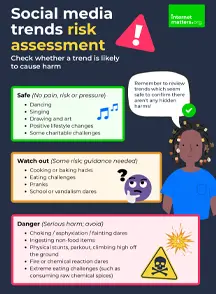
Trend risk levels
- Green (safe). These are trends which promote creativity, kindness or knowledge. They might also be simply designed to get a laugh (though how this is done is important).
- Amber (watch out). These are trends which might focus more on consumerism or lifestyle changes, such as investing in fast fashion trends or committing to a 30-day workout.
- Red (danger). These are trends which could physically or mentally harm your child such as by giving health advice that could lead to disordered eating, self-harm or even death.

Frequently asked questions (FAQ) about trends
It’s impossible to know about every trend as it’s happening, but open conversation can help you stay on top of your child’s digital life.
You could offer to do challenges together, send your favourite video to each other every day, ask them about news stories, etc.
Over time, these regular actions can help make conversations about dangerous challenges a little easier to help you feel more in the loop.
Talking about dangerous challenges out of the blue might lead to less conversation, not more.
However, if you’ve seen a news story or a post on your own social media feed about a trend or challenge, it’s a good way to start the conversation.
“I read this story about XYZ. Have you heard about it? What do you think?”
Explore more conversation tips further down this page as well.
From beauty routines to energy drinks, social media algorithms might introduce your child to new trends on a regular basis. This helps feed into the fast fashion industry as well as other markets.
Whether it’s safe for your child depends on many factors. Before buying a product, review ingredients and intended audience. For example, many beauty products which are great for adult skin can actually harm children’s skin.
Inputting the ingredient list into an AI tool and asking whether it’s harmful for a child can help. However, make sure to double check any claims that something is safe with other sources as well.
Some parental control software can feel invasive, both as a parent and as a child. Before setting any up, make sure you’ve included your child in the discussion and reached an agreement on what can be monitored.
If your child or teen doesn’t want real time monitoring, agree on an alternative like weekly phone check-ups or daily conversations where you can ensure no one and no algorithm is targeting them without their knowledge.
Remind them that this is about safety, not about stopping them from enjoying their time online.
Tips to manage children’s exposure to trends
Your child might come across online trends and challenges through word of mouth, friends sharing videos or directly through an online platform.
As such, there are two main considerations to help manage your child’s exposure: how their algorithms work and what conversations you have with them.
Managing algorithms
Algorithms suggest content to users based on their activity such as what content they watch or react to. They also suggest content based on what other users in the same demographic are engaging with. Popular news stories or worldwide trending topics also often influence a user’s algorithm.
To help minimise the chance of challenges or trends to come across your child’s feed, review the app’s content settings.
- If your teen sees content featuring trends or challenges, encourage them to mark it as ‘Not interested’ every time.
- Turn on the STEM feed, which then features more content on the For You feed related to science, technology, engineering and maths rather than social trends.
- Add to the filter keywords section to prevent content featuring those words showing up in your child’s recommendations. Start with ‘trend’ and ‘challenge’, then experiment from there.
- If your teen sees content featuring trends or challenges, encourage them to mark it as ‘Not interested’ every time.
- Similarly, if they are suggested content which they really enjoy, they can make it as ‘Interested’. Alternatively, they can turn of suggested posts altogether.
- In the Content preferences section (under Settings and activity > What you see), curate ‘Your algorithm’ by adding topics your teen wants to see as well as those they don’t want to see. Include ‘trends’ and ‘challenges’ to start with.
- Your teen can also reset their suggested content completely to start afresh.
- Turn off watch history and autoplay to restrict recommendations and watching content automatically, which can then influence the algorithm.
- If using parental controls, turn on Restricted Mode to decrease the number of inappropriate videos which may end up as a suggestion.
- Under Time management, set a limit on the YouTube Shorts feed to reduce the amount of content that your child will see.
- Use Google Family Link for greater restrictions.

Conversations to have
The algorithm is only one parts of navigating social media trends and challenges. Conversations on a regular basis are key to helping your child assess content and decide whether it’s safe to copy.
- Share some of your own favourites from the past, which you could possibly laugh about now (e.g. perhaps there was a Vine trend you hopped on).
- Share any that you’ve seen recently that you liked or thought were strange (e.g. maybe you’re confused by a strange dance routine).
- Ask them what they like about the ones they’ve seen.
- Have they tried any?
- Are there any that they want to try, which you can try together?
- Share examples of trends/challenges that you’ve seen which are scary such as any that have come up in the news.
- Ask your child what they think of these challenges. Would they ever take part?
- What would keep them from taking part that sets them apart from someone who was harmed by trying the challenge?
- Take the time to discuss and maybe agree on ‘red flags’ which mean trying a challenge themselves could cause harm.
- Discuss who pressures them (or it more a sense of missing out)?
- Talk about what would happen if everyone except them took part and how they would feel.
- Share your own experiences and feelings of pressure growing up, especially around doing something that you knew was dangerous.
- If you still feel those pressures, discuss with your child how you overcome it.
- Work together to figure out how they can manage any pressure they feel.
Any conversation you have about their digital life is a positive one. The more you chat, the more likely it is that your child will come to you if they have questions, are worried or are in trouble.
Keep conversations and check-ins light. Share your own experiences where you can and listen more than you speak when it’s their turn to share.

More in the hub

Supporting resources

Guide to online challenges
Online critical thinking guide

Knowing if something is wrong

Find the Fake quizzes
 Close video
Close video
Close video
Close video
Close video
Close video
Close video