
What are the concerns around social media?
From pressure to ‘look perfect’ to the risks of oversharing, this guide breaks down common social media concerns and gives you practical ways to support your teen.

What’s on this page
Explore the below concerns and find tips on helping your teen navigate risk so they can keep feeling positive about their online experiences.
- Age minimums and bans
- Endless scrolling and too much screen time
- Creating a digital footprint
- Cyberbullying and online hate
- Contact with strangers
- Oversharing and privacy risks
- FOMO and peer pressure
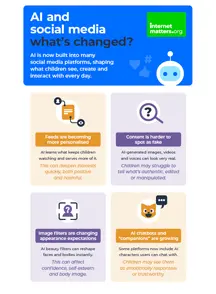
- AI tools and companionship
Age minimums and bans
In summer 2026, the UK government announced a ban for under-16s on social media. While we wait for details around the ban, you can still take action to keep your child safe on social media by paying attention to minimum age requirements.
Most popular social media platforms have an age minimum of 13. Apps like TikTok and Instagram provide teen accounts to those aged 13 to 16.
FAQs
While it can be difficult to manage pressure from your child’s friends or their feelings of missing out, try to keep them off platforms they’re not yet old enough for.
Explore child-friendly platforms and have open conversations with them about the safety risks that come with using platforms before they’re old enough.
Children who lie about their age or use their parent’s account are at greater risk of coming across content or strangers they are not yet prepared to deal with.
If possible, try having a discussion with parents of your child’s friends to see if you can work together on keeping the friendship group off of dangerous platforms together. This can help reduce the pressure your child might feel.
We expect to know more details about the announced social media ban before the end of 2026. It’s likely that new rules would be implemented from spring 2027. Learn more about the ban here.
It’s important to remember that the ban is unlikely to apply to all forms of social media. So, even after the ban is in place, your teen may still be able to access lesser-known platforms. Continue to talk with your child and set safety controls wherever possible across new and existing platforms.
Many children on the cusp of turning 13 might be looking forward to accessing platforms like TikTok or Instagram. When the ban comes into place, this might mean that the excitement is replaced by disappointment.
If you can, start talking about what’s coming before it happens. Work together to find alternatives that might be more appropriate for them.
Whenever you have these conversations, validate their feelings. For many, joining social media can feel like a rite of passage. So, talk with them and let them know it’s okay to feel upset.
Endless scrolling and too much screen time
Most social media platforms are designed to keep users engaged. This is tough for adults to navigate and more so for children. YouTube, TikTok and Instagram all have screen time tools built in, which you can use via your parent account or which you can help your child set themselves.
Scrolling endlessly (sometimes called ‘doomscrolling‘) and consuming content passively can often lead to feelings of ‘too much’ screen time.
Share your concerns with your child around screen time on social media. Agree house rules on when and how long they can go online and which apps/platforms they can use.
- Try to turn off devices 30-60 minutes before bed to give your child’s brain time to wind down.
- Get everyone in the family on the same page – if one child’s device is going away at a certain time, everyone else should follow too (including the adults).
- Make use of built-in platforms tools for supervision and monitor children’s use. Popular social media apps like Instagram and Snapchat offer tools to link parent accounts to a teen account so you can keep an eye on what your child is doing.
- Use device based controls such as Google Family Link for Android devices and Apple Family Sharing for Apple devices set limits on what children have access to and at what times.
Creating a digital footprint
Remind your child that the images and videos they share online creates a digital footprint that can impact them for years to come. When sharing online, they should ensure that their content is private and only visible to close friends they know.
You can also help them maintain a positive presence online by:
- Encouraging them to think before they share. They should understand that their actions online can affect both themselves and others.
- Teaching them that even messages sent between friends can get passed on and accounts can be hacked. So, if they wouldn’t wear it on a t-shirt, they shouldn’t share it online.
- Being a role model so your child understands that you’d never post anything that you wouldn’t want them to see.
Cyberbullying and online hate
The nature of social spaces is that cyberbullying and hate is inevitable. However, your child can make sure to keep profiles private, block people who are making them feel upset and avoid adding strangers to their friends lists.
Also, talk together about peer pressure and how screens and anonymity can lead to behaviour that is hurtful. No parent wants to think of their child hurting someone, but to help them exhibit positive online behaviour you can:
- Explain cyberbullying and hate to your child. Talk about the things they might see or read online.
- Discuss how to respond if they see offensive content online and what might be good, or not so good to share.
- Talk about the blurred line between uploading and sharing content because it’s funny or might get lots of ‘likes’ versus the potential to cause offence or hurt.
Stay calm, listen without judging and reassure your child that you can help. Discuss any action you may take together. Encourage them not to retaliate and to save any evidence.
Make sure they know they can talk to you if anyone ever upsets them over the internet or on their mobile phone, and give them the space to talk about anything without being judgemental or getting upset.
Contact with strangers
Make sure your child understands that people may hide behind fake profiles for dishonest reasons and the person they’ve been chatting to could easily be someone with bad intentions.
Remind your child that they should never give out personal information to someone they don’t know online. Make sure they understand what personal information is.
Be clear with your child that they should never meet someone face to face without your consent. Show them how to block and report anything offensive.
Your child should know they can come and talk to you if someone or something is making them feel uncomfortable online.
Oversharing and privacy risks
Talk to your child about who they’ve shared the information with and assess the risk it poses to your child. You can also ask your child to remove the information from their account and help them understand how to share safely..
- Make your child aware of the potential risks of sharing personal content online such as online grooming or cyberbullying.
- Help your child understand how to remove information that could pose a risk to them.
- Check that your child has set their social network account to ‘private’ so their shared information can only be seen by people they know. See our ‘how to guides‘ to find out how.
FOMO and peer pressure
Encourage them to think about why friends may share certain posts. Show them how to gently challenge their friends if they find their content offensive. Remind them they can always talk to you about things happening online.
- Judge what effect the content is having on your child. Ensure they know that they should report abusive or inappropriate content on the social platform and consider blocking anyone that may be saying hurtful things.
- If they are deeply affected by the posts, consider advising them to take a break from the social network and concentrate on other activities that might make them happier.
- If you feel that the comments may be affecting your child’s mental health and wellbeing, it’s best to go and see your GP. Depending on the seriousness of the comments, it might be advisable to file a police report. If you do take this step, make sure you keep some evidence that records what’s happened and how it’s affected them.
Make sure they know that some people may not be who they say they are and tell your child how privacy settings can put them in control of who they talk to.
Tell them about not replying to or blocking any followers they don’t know. Make sure they know never to meet up with anyone they have only ever met online and don’t know in person.
Discuss what it means to be a ‘friend’ or a follower online, the pros and cons of having lots of these ‘friends’ and the importance of knowing that they’re people you can trust.
Be clear that if someone doesn’t make you feel good about yourself, they’re no friend.
AI tools and companionship


Supporting resources
Explore these guides to help navigate concerns you might have around your teen on social media.
Social media-ready checklist
Platform supervision tools

Step-by-step parental controls
What to do if your child is contacted by a stranger
 Close video
Close video
Close video
Close video
Close video
Close video
Close video