Many parents carefully choose which family photos they post online. But how often do we think about the photos we never share?
A recently introduced Facebook app feature has raised new questions about how much access social media apps should have to our personal photo libraries. While it is designed to offer AI-generated photo suggestions, it also serves as a reminder to review the permissions we have given apps over time.
Summary
- Facebook’s camera roll cloud processing can use photos and videos from your phone to create AI-generated suggestions.
- Your camera roll can contain much more personal information than the photos you choose to share online.
- Family photos can also include other children and people who have not chosen to share those images.
- You can review both Facebook’s own settings and the permissions you have given Facebook on your phone.
- Checking app permissions regularly can help you stay in control as apps introduce new features.
What is ‘camera roll cloud processing’ from Facebook?
‘Camera roll cloud processing’ is a Facebook feature that uses photos and videos stored on your phone to create personalised suggestions.
You may see a message in the Facebook app asking whether you want to allow cloud processing to get creative ideas from your camera roll.

The feature may be offered as an optional prompt, and availability, wording and controls can vary by country, account and app version.
If you allow it, Facebook can upload photos and videos from your device to Meta’s cloud. Its systems can then use that content to create suggestions such as collages, recaps and AI-generated edits.
This is different from choosing a photo yourself and uploading it to Facebook. Instead, you give Facebook permission to access photos from your camera roll.
What happens to your photos?
To create suggestions from your photos, Facebook needs to process information from your camera roll.
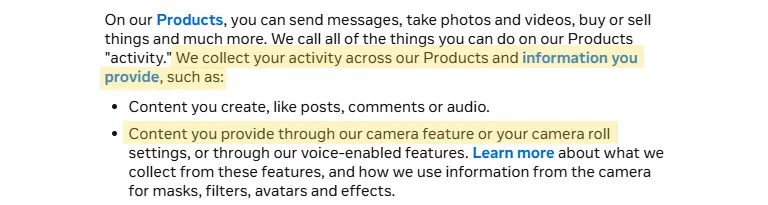
Meta’s privacy policy includes content provided through camera and camera roll settings among the information its systems can process. This can include information used to personalise features and provide AI-powered experiences.
This is important because your camera roll is usually much bigger and more private than your social media profile.
Why does this matter for families?
For parents, a camera roll can become a private archive of a child’s life.
It can contain photos from the day they were born through to school, holidays, birthday parties and everyday life at home. Many of them were never meant to leave your phone.
But photos are not the only things we keep there.
You might take a photo of a document because you need it later. You might save a screenshot containing personal information. You might have photos showing the inside of your home or other details about your family.
This means giving an app access to your photo library can give it access to much more than the photos you would normally choose to share.
Your photos can include other children
Family camera rolls also contain photos of other people.
Think about birthday parties, school events, sports clubs or playdates. Your photos might include your child’s friends, classmates or other children in the background.
Their parents may have made different choices about how and where photos of their children are shared.
This is another reason to think twice about giving an app broader access to your photo library.
Before you enable camera roll cloud processing
Before turning on a camera roll feature, it is worth pausing to consider what you are being asked to allow.
What is the benefit for your family? A collage, recap or AI-generated edit may be useful or enjoyable, but it is reasonable to decide that it is not worth giving a social media app access to a private family archive.
It is also worth thinking about what else may be stored in your camera roll. Alongside family photos, it could contain screenshots, school information, travel plans, documents, home interiors or pictures including other people’s children.
Parents may also want to consider whether there is a narrower option. In some cases, phones allow you to give an app access only to selected photos rather than your entire library. Choosing individual pictures when you want to post them can give you more control.
Permission is not permanent. If you try a feature and later change your mind, you can revisit both Facebook’s settings and the permissions you have given the app on your phone.
How to manage Facebook’s access to your photos
There are two things to check. You can review the features enabled inside Facebook and the permissions Facebook has on your phone.
Review camera roll settings in Facebook
Open the Facebook app and go to:
Settings & Privacy > Settings > Camera roll sharing suggestions.
Review the camera roll options available on your account.
If you do not want Facebook to use your camera roll for these suggestions, turn off camera roll cloud processing and any other camera roll suggestions you do not want to use.
Settings and feature names can change, so the exact wording may look slightly different depending on your version of the Facebook app. You may also be able to search Facebook’s settings for ‘camera roll’.

Review Facebook’s photo permissions on your phone
You can also control how much of your photo library Facebook can access at device level.
Note that the exact steps may vary depending on your phone and operating system.
Go to:
Settings > Privacy & Security > Photos > Facebook
Depending on your iPhone version, you can limit Facebook to selected photos or remove its access.
Go to:
Settings > Apps > Facebook > Permissions > Photos and videos
From here, you can review or remove Facebook’s access.
Review app permissions regularly
Most of us give apps permissions when we first install them and then forget about them. But apps change.
You may have given an app access to your photos years ago. Since then, the app may have added new features that use that access in different ways. AI makes this especially relevant.
Features that analyse, organise or edit content are becoming more common in apps families already use. That is why it is worth checking what you have enabled and deciding whether you still want to give the same level of access.
Privacy is not only about what we choose to post. It is also about what our apps are allowed to access.