
What to do if your child spends too much time online
Supporting children with additional needs
Use this simple guide to help balance your child’s digital diet if they’re spending too much time online.

On this page
- Steps for if your child spends too much time online
- What to do next
- Activities to do together
- Helplines and communities
- More screen time resources
Steps to take if your child spends too much time online
Follow the steps below to help your child find balance in their screen time to support their wellbeing.
1. Figure out the ‘why’
Talk to your child to figure out why they spend so much time online. They might simply find switching off challenging. Routines and boundaries can help with this.
However, if your child is overusing devices to manage anxiety or depression, or to avoid conflict, you will need to offer additional support such as therapy or wellbeing activities.
2. Set controls and boundaries
Create a family agreement to hold the whole family accountable. Set screen-free zones for everyone to follow and use visual timers to support the rules you agree on.
Use screen time parental controls to help enforce these boundaries. Find step-by-step guides to help you set these controls.
3. Redirect their attention
Introducing screen time limits is likely to lead to conflict, but having alternatives ready for screen-free time can help.
This might look like going to the park, trying a new craft or art project, playing a sport together or any other activity your child might enjoy.
4. Model changes yourself
Even as parents, it’s easy to lose track of screen time. If you are reducing your child’s screen time, reduce yours too.
Narrate the choices you make and when you slip up to let your child know that it’s about trying, not being perfect.
5. Talk about their screen time
Ask them about their time on devices. What do they enjoy? What do they want less/more of?
Adjust boundaries as they grow, based on these conversations and their developing needs.
What to do next
When you make changes to screen time limits, expect arguments and potential meltdowns. You will need to be resilient and consistent for change to take shape.
Some children with additional needs might need more support than others to get into new screen time habits. This could take several months, so patience is key.
Click any issue that your child is experiencing below to find strategies for support.
For some children with additional needs, limiting screen time can really feel like the end of the world. If your child struggles to regulate their emotions or gets overwhelmed by change, you might notice they are finding the new limits challenging.
- Restart small. If you’ve reduced their screen time limit by more than 10 minutes, it might be a shock to their system. Go back to the start and try reducing by 5-10 minutes. Decide on how long you’ll wait (e.g. one week) before reducing by another 5-10 minutes. Repeat for however long it takes until you reach your goal.
- Let the storm pass. If your child is dysregulated or in the midst of a meltdown, keep your voice low and quiet. Wait for them to find their calm before trying to rationalise or explain anything.
- Create a safe place. You might already have somewhere that your child can go when they feel overwhelmed. Adapt this space to ensure it’s screen-free, cosy and has sensory activities or fidget toys. Redirect them to his space if they are overwhelmed when a new limit is enforced.
For some children with additional needs, the digital space is their safe space. Many games and videos offer routine and reliability, so limiting devices or access to a specific platform can feel scary for them.
- Create a daily schedule. Set up new routines to help your child see what is coming and when. Some children will benefit from this being very visual or having specific times (e.g. ‘at 4 PM, you can play a game of your choice until 4:30 PM).
- Use visual timers. Using the device timer or a fun one that you find online, start a timer for each activity. This can help them achieve what they want to within their screen time while helping them prepare for upcoming transitions.
- Narrate what comes next. Even if you have a daily schedule and visual timer, narrating what comes next can help cement expectations. For example, you could say ‘you can play your game for 30 minutes, then we’ll do your reading homework at half 4’.
Screens provide a lot of stimulation, from repetitive sounds to bright visuals. When a child with additional needs has been in that space for extended periods, it can be difficult to switch off.
They might not know how to entertain themselves outside of this space or they might struggle to find the same level of stimulation. This can lead to pacing, fidgeting or sensory-seeking in potentially unsafe ways.
- Swap visuals for audio only. If your child likes to be surrounded by noise, putting on their favourite music or an audiobook after screen time can help. They will still receive some kind of stimulation but can give their eyes and brains a rest.
- Swap for ‘heavy work’. Some children with additional needs might benefit from physical activity after screen time to adjust. Jumping on the trampoline, crawling like an animal on all fours, running at the park at full speed — anything that gets the heart pumping or muscles working hard.
- Use fidget tools. Toys, kinetic sand and similar tools can work as an outlet for your child’s energy that comes after overstimulation. Have these available right after their screen time ends for an immediate outlet.
Activities to do together
These activities can help your child manage their wellbeing and keep themselves safe online.

A Delicate Balance

RISE: Mindful strategy cards

RISE: Emotional regulation workbook

Childline: Coping Kit
 Close video
Close video
Close video
Close video
Close video
Close video
Close video
Helplines and communities
The following organisations and help you and your child find support. From helplines and 1-2-1 chats to message boards, use the resource that works best for you.
For parents/carers
For children and teens
More screen time resources
The following resources can help you and your child learn more about balancing screen time to support wellbeing.
Adapt these resources as needed to support children with additional needs.

Managing screen time
Online games screen time guide
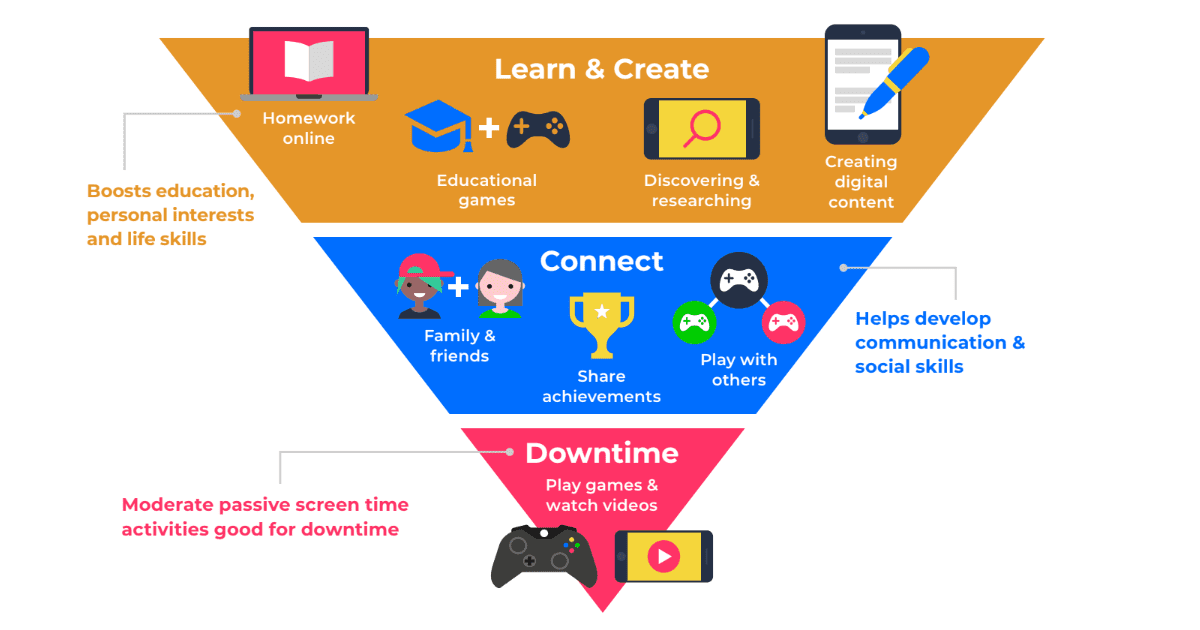
Balancing screen time guide

Screen time: Facts & advice
Close video
Close video
Close video
Close video