
Making online viewing safer for children
Children love watching their favourite shows, exploring educational videos, or discovering new websites, but not all content is suitable for young viewers.
Here’s how you can create a safer online environment for your child.

Jump to section
Guiding children to positive content
Help your child find appropriate and positive content. You can do this by showing them positive content creators, bookmarking child-friendly websites and exploring their interests online together.
As your child develops their critical thinking skills, they can become better at judging which content is appropriate and beneficial for them.
Guide your child to use websites and apps that are designed for children. Popular, reliable options include:
- BBC iPlayer Kids: Fun, educational shows tailored for young audiences.
- CBeebies Website: Interactive games and videos that help young children learn while they play.
- National Geographic Kids: A mix of videos, quizzes, and articles that spark curiosity about the world.
- YouTube Kids: Offers curated content for younger children to watch and parental controls to manage screentime.
- Swiggle: Child-friendly search engine for kids.
Whenever possible, co-watch shows or browse websites with your child. Not only can you ensure the content is appropriate, but it’s also a great way to bond.
Why It Helps:
- You can explain confusing or sensitive topics.
- It’s a chance to reinforce family values through discussions about what you’ve watched.
- You’ll learn more about your child’s interests and preferences.

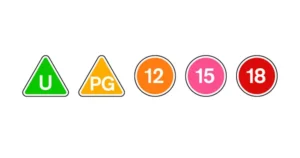
Pay attention to content ratings
Most major streaming platforms have age rating and content warnings on their videos. Encourage your child to check these labels before watching anything, and consider agreeing together what ratings they are allowed to watch and which content warnings to look out for.
Agreeing on these rules collaboratively, rather than imposing them on your child, will help your child understand why they are in place and make them more likely to follow them.
Turn on content filters and parental controls
Most streaming platforms and devices offer built-in parental controls to filter content. Take advantage of these tools to restrict age-inappropriate content.
How to get started:
- YouTube Kids: Customise viewing limits and block unsuitable videos.
- Netflix Kids: Set up a child-friendly profile to restrict mature shows.
- Smart TVs and devices: Adjust settings to enable restricted modes or family filters.

More in the hub

Supporting resources
Explore our guides to help your teen experience more benefits and less harm online.
Entertainment parental controls

Digital Matters
Online critical thinking guide
 Close video
Close video
Close video
Close video
Close video