
What is Roblox?
How can I help my child stay safe while playing Roblox? If you’re one of the many parents who grapple with this question, explore the guide below to build your confidence.

Explore the guide
There are many concerns around Roblox in social media and the news. However, the right controls and parental oversight can give you peace of mind when it comes your child’s time online.
To help you understand what makes Roblox so popular and how to ensure your kids don’t get any nasty surprises, explore the guide below.
What is Roblox? Parents' guide to playing safely
Roblox is popular among children worldwide, even though it is an odd-looking and often confusing platform (for parents at least).
Like Minecraft before it, its attraction to youngsters is partly because mum and dad don’t get it. That makes it all the more exciting but can also lead to fears over its safety. After all, players spend most of their time on Roblox playing online.
How it works
Roblox is an online video game platform where users create most of the content. That is, users can create their own games for the public using Roblox Studio. Users can create and publish games to the community using simple tools. And that means they can try ideas that wouldn’t get funded for a commercial release.
Children worldwide can then play these games, often online together, through a smartphone, video games console, tablet or personal computer like a laptop.
Important update to Roblox parental controls – linked accounts
To help families manage children’s experiences on the platform, parents can now create and verify their own Roblox account and link it to their child’s account. Once linked, they can manage settings remotely, including:
- Screen time limits
- Spending restrictions
- Content maturity settings
- Communication permissions
- Friend and contact management
These tools can help families tailor Roblox to suit their child’s age, maturity and online experience.

What games can children play on Roblox?
Roblox offers millions of user-created experiences covering everything from roleplay and adventure games to racing, building, simulation and educational challenges. Popular experiences can include running a virtual business, caring for pets, solving mysteries, competing in obstacle courses or creating new worlds with friends.
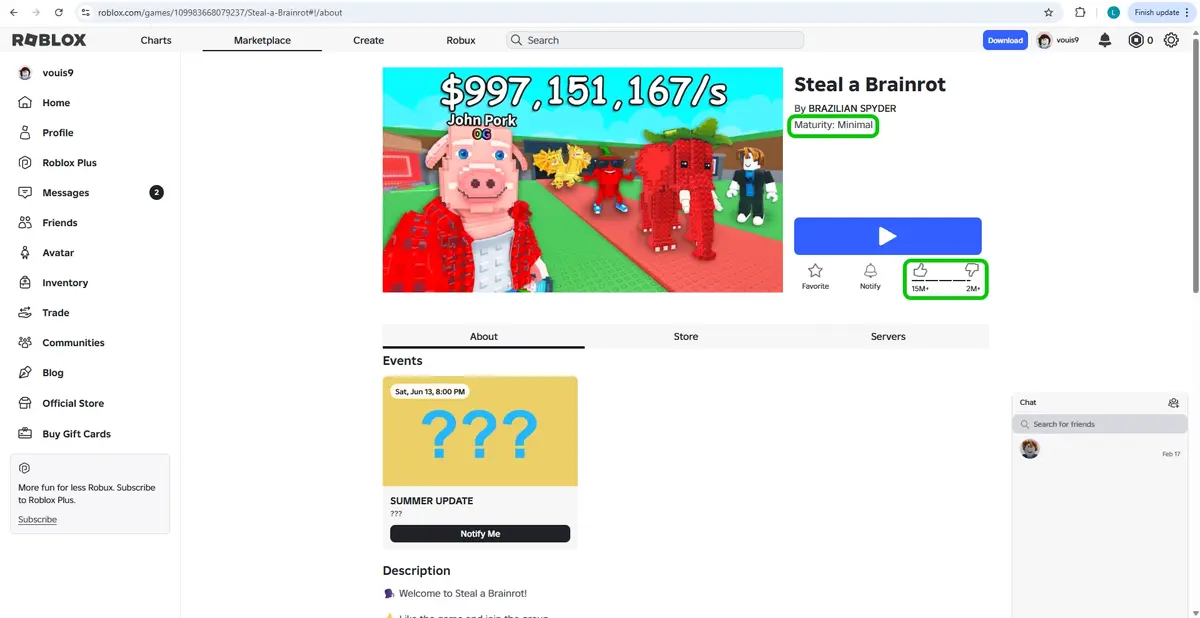
To help families find suitable content, Roblox uses content maturity labels and parental controls. Parents can set content restrictions based on their child’s age and maturity, helping to limit access to experiences that may contain more intense themes, violence or social interactions.
Because Roblox experiences are created by users, the content available on the platform is constantly evolving. Creators can quickly update experiences based on player feedback and trends, which helps keep the platform engaging but also means parents should regularly review what children are playing.
Much of Roblox’s appeal comes from the variety of experiences available and the ability to play, create and socialise with millions of other users around the world.
Parent tip
Before children start playing a new experience, take a few moments to:
- Check its content maturity label
- Review user ratings and descriptions
- Explore the experience together
- Make sure communication settings are appropriate for your child’s age
What is Roblox's age rating or minimum age?
Unlike traditional video games, Roblox is a platform that hosts millions of user-created experiences. Because content is created and updated by users, Roblox does not have a single age rating or minimum age. However, in Europe, PEGI has altered their rating from PEGI 7 to Parental Guidance Recommended (PEGI !) because of the amount of user-generated content. This reflects the wide variety of content available on the platform and the fact that some experiences may be more suitable for older children and teens.
To help families make informed decisions, Roblox uses Content Maturity Labels on all content on the platform.
What do Roblox’s Content Maturity Labels mean?
These labels are:
- Minimal: May contain occasional mild violence, light unrealistic blood and/or occasional mild fear.
- Mild: May contain repeated mild violence, heavy unrealistic blood, mild crude humour and/or repeated mild fear.
- Moderate: May contain moderate violence, light realistic blood, moderate crude humour, unplayable gambling content and/or moderate fear.
- Restricted: May contain strong violence, heavy realistic blood, moderate crude humour, romantic themes, unplayable gambling content, the presence of alcohol, strong language and/or moderate fear. These games are only available to 17+ users who verified their ages by completing ID verification.
Some Roblox features and experiences require users to verify their age before they can access them. This is designed to help prevent younger users from accessing content intended for older teens and adults.
Can parents control what games children can access?
Yes. Parents can link their Roblox account to their child’s account and use parental controls to manage content settings.
These controls allow parents to:
- Restrict access to experiences based on content maturity
- Manage communication settings
- Monitor screen time
- Review connections and friends
- Block specific experiences if needed
Parent tip: Rather than focusing solely on age ratings, consider your child’s maturity, online experience and ability to recognise risks. Two children of the same age may be ready for very different online experiences.
Concerns around children using Roblox
While Roblox has safety tools, moderation and parental controls in place, no system is perfect. Like many online platforms with user-generated content and social features, there are risks parents should be aware of.
Inappropriate content
An April 2025 report from Revealing Reality highlighted “suggestive behaviours” among other concerns. The research team created Roblox accounts for 5-, 9-, 10-, 13- and 42-year-olds to test the interactions of different users based on their age.
Exploring as the 10-year-old, the team was able to access “highly suggestive” spaces. These included games featuring hotels with private rooms and characters dressed in “sexually suggestive outfits.” Revealing Reality noted that a 10-year-old was easily able to “observe and participate in conversations” that were often adult in nature.
One game designed like a night club was called ‘Boys and Girls Club Roleplay’. It had a Content Maturity Level of ‘Mild’ despite the “strong sexual undertones” and accessibility for children. Users received no warning about the material before entering the game. Following the launch of the report, the game is no longer available.
Games on Roblox should be appropriate for children if rated ‘Mild’. If you don’t believe a game is appropriate for the rating it has, make sure you report it and block it using built-in parental controls. Encourage your child to also report such games.
Contact from strangers
Being an online game means that players in Roblox can interact and communicate with each other in various ways. This can be via voice or written text once friend requests have been made.
While parents might worry about children talking to strangers, it’s important to remember that most strangers are not predators. However, some strangers might target your child if they seem vulnerable.
The risk of contact with strangers can be reduced by using private servers. Private servers allow your child to play games only with invited friends, preventing strangers from joining the session. Some games require users to pay to create a private server, while others allow players to create private servers for free.
Make sure your child understands that:
- They should never share personal information like their address, school or anything else (even if the person says they live in a different country);
- Some people are not who they say they are, so it’s better to be cautious;
- They can come to you if they have any questions or concerns (and you will respond calmly and without judgement);
- There are signs that someone might be targeting them for grooming, scams or other issues;
- They can and should make use of the in-game reporting and blocking features if someone makes them uncomfortable.
Voice chat on Roblox
Some Roblox experiences include voice chat, allowing players to speak with each other in real time rather than using text messages. While this can make gameplay more social and immersive, it can also increase the risk of children hearing inappropriate language, being contacted by strangers or sharing personal information without thinking. Voice conversations can feel more immediate and personal than text chat, which may make it harder for children to recognise potential risks.
To help manage this, Roblox restricts voice chat features to eligible users and uses a combination of age verification, moderation technology and community reporting tools to identify and respond to harmful behaviour. Parents can also review and manage communication settings through linked parent accounts. As with any communication feature, it is important to talk regularly with children about who they are speaking to online, what information should remain private and how to report or block users who make them feel uncomfortable.
Moving conversations to other platforms
Some users may encourage children to continue conversations on other platforms such as Discord, Snapchat, Instagram or WhatsApp.
Encourage children to:
- Keep conversations within Roblox where possible
- Never share personal information
- Avoid moving chats to other apps without discussing it with a trusted adult
- Tell an adult if someone makes them feel uncomfortable or pressured
Scams and fake Robux offers
Many scams on Roblox promise free Robux, exclusive items or special rewards. These offers often aim to collect account details or personal information. Encourage children to avoid clicking unfamiliar links and remind them that if an offer seems too good to be true, it probably is.
AI-generated scams
As artificial intelligence (AI) tools become more widely available, scammers are finding new ways to make fake messages, websites and offers appear more convincing. On Roblox, children may come across promises of free Robux, exclusive items or special game benefits that look genuine but are designed to steal account details or personal information. Some scams may use realistic images, videos or messages that appear to come from trusted creators or Roblox itself.
Remind children to be cautious of offers that seem too good to be true, avoid clicking on unfamiliar links and never share passwords or personal information. Encourage them to check with a trusted adult if they are unsure whether an offer, message or website is legitimate.
Loot boxes and gambling
Loot boxes are common in many online video games. They let users unlock items and rewards usually for purchase at random. However, the rarity of the items can differ from game to game. While the term comes from box-shaped items, these interactions come in many forms. For example, a user could toss a coin into a fountain and receive a random virtual item that way.
Some experts have raised concerns that loot boxes can encourage repeated spending because players do not know what reward they will receive. This can make it harder for children to understand the value of in-game purchases.
In Roblox, the Terms of Use state that Creators who offer random virtual items (i.e. loot boxes) for payment must state the odds of each type of item a user might receive. But because users don’t know which item they will actually receive, some have compared loot boxes to gambling.
Some Creators make gambling-themed games as well. However, users cannot win real money from these games. Instead, they earn Robux. If they can earn items, the same rules above apply — users must clearly identify the odds of winning each item.
Roblox has introduced additional restrictions for UK users under 18 around experiences that include paid random items, helping to limit younger users’ exposure to gambling-like mechanics.
Other in-game purchases
While Roblox is free to download and play, many experiences encourage players to spend Robux on virtual items, upgrades, customisation options and premium features. This can make it tempting for children to ask for additional purchases as they play. To manage this ensure that you are tracking and password-protecting credit cards on your systems, so no unanticipated purchases are made. It’s worth talking to your child about this commercial aspect of the game before they play. You can also set up parental controls in Roblox to set spending restrictions.
All the games work fine without additional content, but at the same time will signpost players to benefits of spending money. This is how gamemakers make a profit from their creations made in Roblox Studio.
What kind of parental controls does Roblox have?
In addition to setting broadband and device controls, Roblox has built-in parental controls you can set. By setting up a parent account, you’ll get a better overview of your child’s activity. Roblox also uses age assurance and verification measures for some features, alongside parental controls and content restrictions, to help create age-appropriate experiences for younger users.
With Roblox parental controls, you can:
- set the Content Maturity Level that your child can access;
- block specific games that are within their Level but you don’t want them accessing;
- set screen time restrictions and get an overview of their time on Roblox;
- limit who they can contact and who can contact them, including adding new Friends;
- turn on spending restrictions;
- report users; and
- manage more features related to children’s privacy and safety.
To set children up for safety on Roblox, it’s important to ensure their account reflects their real age. Roblox parental controls work best for under-13s.
Age-based accounts
Roblox has introduced age-based accounts to the platform. Users are automatically assigned to an account type based off the age they input when creating a profile. Anyone who doesn’t verify their age is assigned to a Roblox Kids account.
Age-based accounts are divided into Roblox Kids accounts and Roblox Select Accounts.
Roblox Kids (Ages 5-8):
- Access limited to games with a Minimal or Mild content maturity label
- All communication with other players is disabled
Roblox Select (Ages 9-15):
- Access limited to games up to and including Moderate content maturity label
- Chat is gradually introduced with safeguards, enabling game chat from age 9 and private messaging as they get older.
Roblox (Ages 16+)
- Requires age-check
- Access to all content except Restricted content maturity label
- Chat enabled by default
Additional supervision features
Roblox has several other ways to monitor account activity beyond parental controls. While logged into your child’s account, you can view the following histories, though some are only viewable in a web browser.
- Direct and small group chat. You can see individual chat histories. This feature only allows access to Friends and Friends of Friends.
- Private message history
- Friends and Followers
- Virtual item purchase and trade history
- Creations such as games, items, sounds, ads, etc.
- Recently played games
Roblox on Xbox
The free game is available on Xbox. How the parental controls work on the Xbox is slightly different from a PC, Mac, tablet or through mobile gaming.
Although the Xbox has controls for friend requests, this doesn’t restrict those in Roblox as they are considered a different type of “in-game” friend. However, the Microsoft terms of service for game makers means that players can’t make new friends while playing on Xbox. They will only see friends already made on the PC, Mac, or tablet.
Additionally, you can further limit the interactions with other players on the Xbox as follows:
- Start Roblox
- Select the Account Settings page
- Identify the Linked Account
- Apply restrictions via roblox.com for this account.
Toggle on/off Cross-Platform Gameplay to limit who your children can play with (Note: Currently Roblox doesn’t support cross-platform messaging, so Xbox players can’t message players on other platforms)
How Roblox fits in 'the metaverse'
The metaverse is becoming more popular with the work from Meta and platforms like Roblox. It’s essentially a vision where users will be able to communicate, interact, play, shop and more all in one place. This may even include seamlessly transitioning from one platform to the next.
Roblox fits well into this idea because users are able to participate in games, concerts and more all within the platform. They create content for each other, which is a large idea for the metaverse. It was founded on the idea of “human co-experience: people doing things together in synchronous 3D spaces.” In this way, it seems a big part of the metaverse.
FAQ
Roblox can be suitable for some 7-year-olds when parental controls are enabled and gameplay is supervised. Parents should review content settings regularly and choose age-appropriate experiences together.
Yes. Roblox offers parental controls that allow parents to manage content restrictions, communication settings, screen time and spending through a linked parent account. Find our parental controls guide here.
Users can block other players directly from their profile or while in an experience. Blocking prevents the user from contacting or interacting with your child on the platform. Learn how to block in Roblox.
Yes. Children can purchase Robux, Roblox’s virtual currency, and spend it on items, upgrades and experiences. Parents can use spending controls to help manage purchases.
Robux are Roblox’s virtual currency, which players can use to buy avatar items, game passes and other in-game content. Robux can be purchased with real money or earned in limited ways through creating content.
Yes. Some Roblox experiences support voice chat for eligible users. Access to certain communication features may require age verification, and parents should review communication settings regularly and discuss safe online interactions with children.
Users can report players, messages and experiences directly within Roblox. Reports are reviewed by Roblox to help identify and remove content or behaviour that breaks community rules. Learn how to report on Roblox.
Some Roblox experiences can help children develop creativity, problem-solving and digital skills, particularly when creating their own experiences with Roblox Studio. However, educational value varies depending on the experience being played.
Stay calm and encourage your child to talk about what happened without fear of getting into trouble. You can then report the content, adjust safety settings and work together on ways to handle similar situations in the future.